The AI design toolkit I use every day (Feb 2026)
The AI apps and tools that have actually stood the test of time for me

Henry Dan
Feb 4, 2026
A lot has changed in my AI workflow since the last time I wrote about this.
Some tools have stuck around, some have been replaced, and a few new ones have become completely indispensable for me. I wanted to go through what I'm actually using every day when it comes to AI tools for my design work, and how that has changed in the last 4 months.
MagicPath is still my go-to vibe design tool
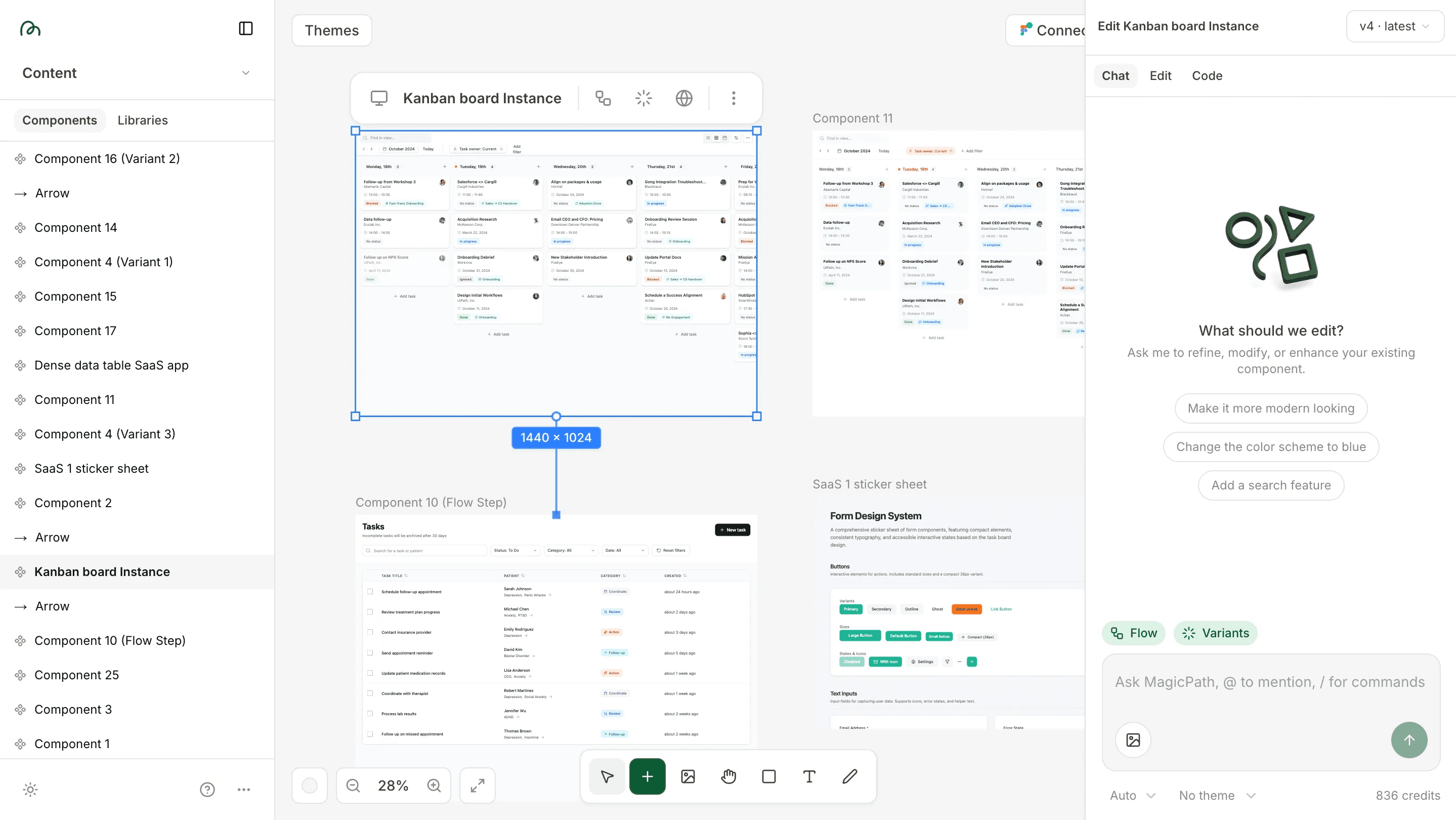
4 months ago I was really excited about Magicpath for design, and that hasn't changed. The open canvas is still the main reason I keep coming back to it. I can see multiple UIs side-by-side, iterate quickly, or fork a UI to explore something new. There are other tools that offer similar features, but I've found that an open canvas is the easiest way for me to interact with a tool like this. Plus they've added Figma import recently, which is really useful.
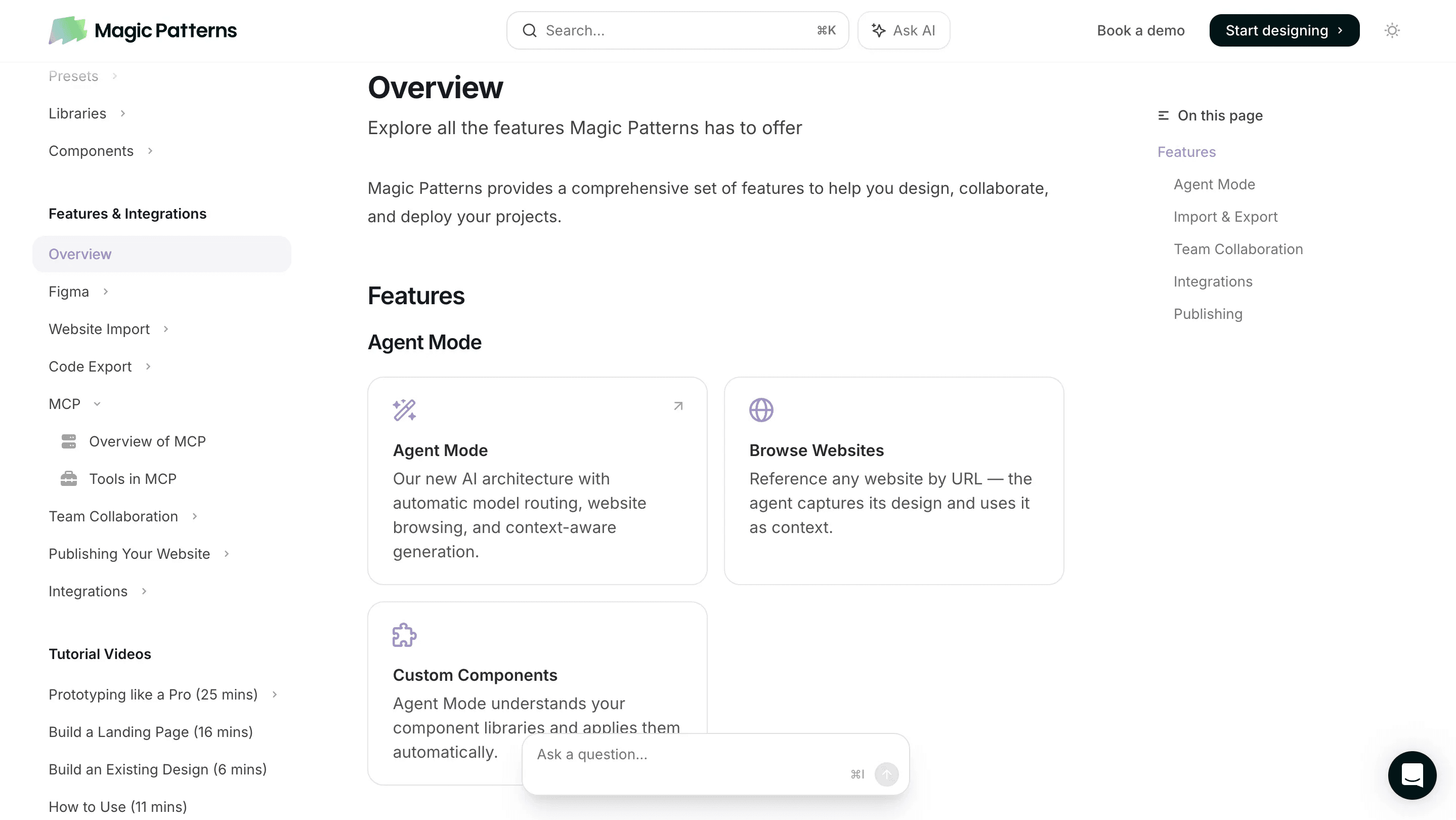
That said, I've been eyeing MagicPatterns. They have features MagicPath doesn't offer yet, like an MCP server that lets you send designs directly with Cursor or Claude Code. MagicPatterns doesn't have the open canvas, but I'm curious if I'd be willing to make that trade-off for the integrations. Plus it still keeps a lot of my non-negotiables for an AI design tool:
Design mode editing so I can change spacing and layout without prompting
Non-destructive version control so I can easily jump between versions without reverting the entire design to an old version
Reusable components and styles so I can prototype separately and tie everything together later
and Built-in Figma import so I don't have to use screenshots
I'll probably give MagicPatterns a real shot soon and see if the integrations are worth losing the canvas.
Another one to watch out for is Paper. Still in alpha, but I'm really excited about what they're building (more on that later).
Claude's my chat tool (with some exceptions)
Claude is still my default chat tool, but how I use it has changed a bit. I lean on Claude more for individual conversations now, while I use other tools for more specialized workflows:
I prefer Notion AI over Claude projects or custom GPTs because of the modular way you can pull in content or write to content (more on this in the Notion AI section)
Gemini is great for image generation and research mode. Claude does research, but I like that Gemini produces these really in-depth, well-sourced research reports that are clear and comprehensive. Plus it was pretty cheap because I'm already paying for Google Workspace.
One thing that hasn't changed: in pretty much any tool that lets me select a model (Notion, Cursor, Granola) I'll almost always switch to Claude Sonnet or Opus. It's subjective, but I think it writes and codes better than any other model (which is 90% of what I use it for) and I just find myself running into fewer issues.
I've also been thinking about upgrading to Claude Max and building out a workflow in Claude Code for prototyping in Cursor, just so I can have one subscription instead of a handful of different tools.
Granola is still my second brain
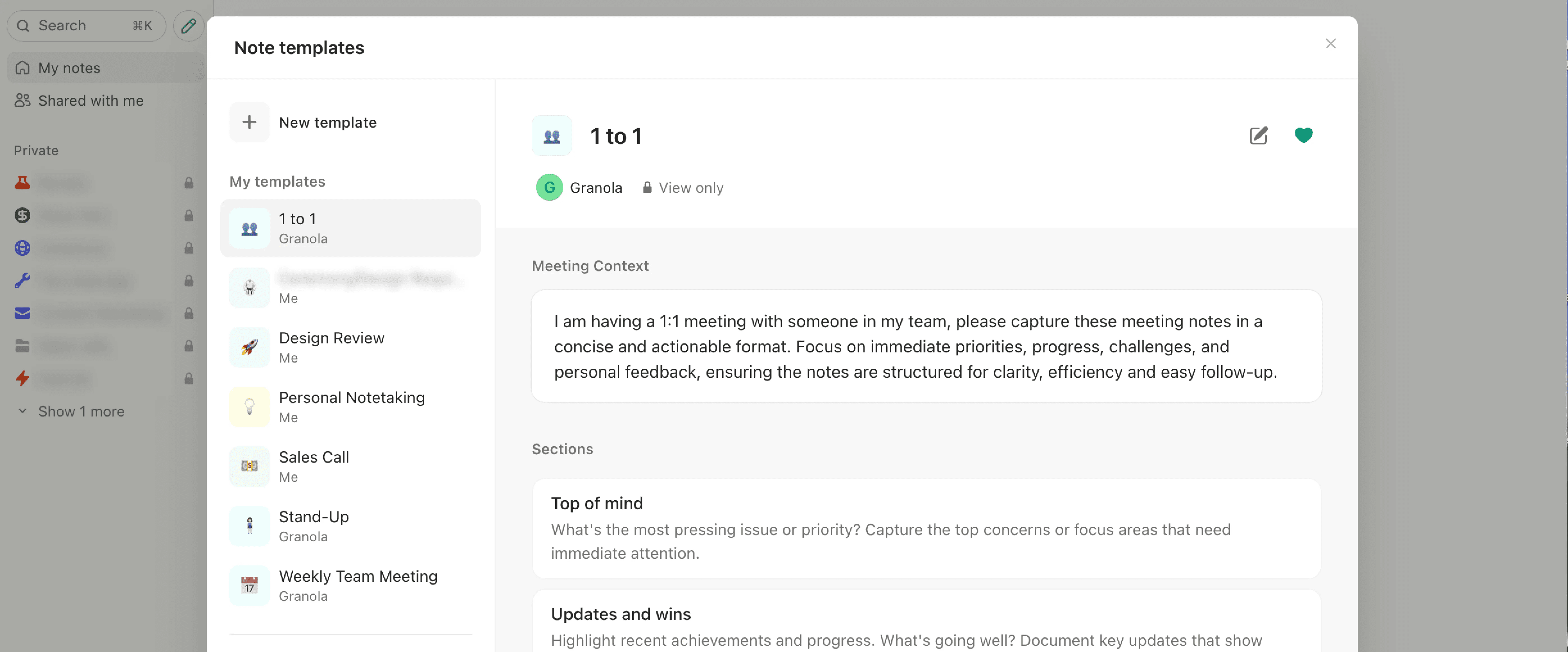
Granola handles all my meeting transcriptions and note-taking. Last time I said It's basically my second brain and I think that still holds true. And it's not just good for notetaking, it's like a repo of all of the information you talk about at work, which turns it into an awesome source of context for AI.
Right now I'm working on setting up more reusable meeting templates and recipes for things I consistently ask it about, plus integrations to send notes to Notion. They've said they're going to release automatic Notion sync soon, which I'm excited about.
One thing that's shifted is that I also used to use Granola for my own personal audio notes, but I stopped doing that to try to keep my meeting context clean. Instead I've started using Notion's audio transcription for that instead.
Notion AI has taken over my work (in a good way)
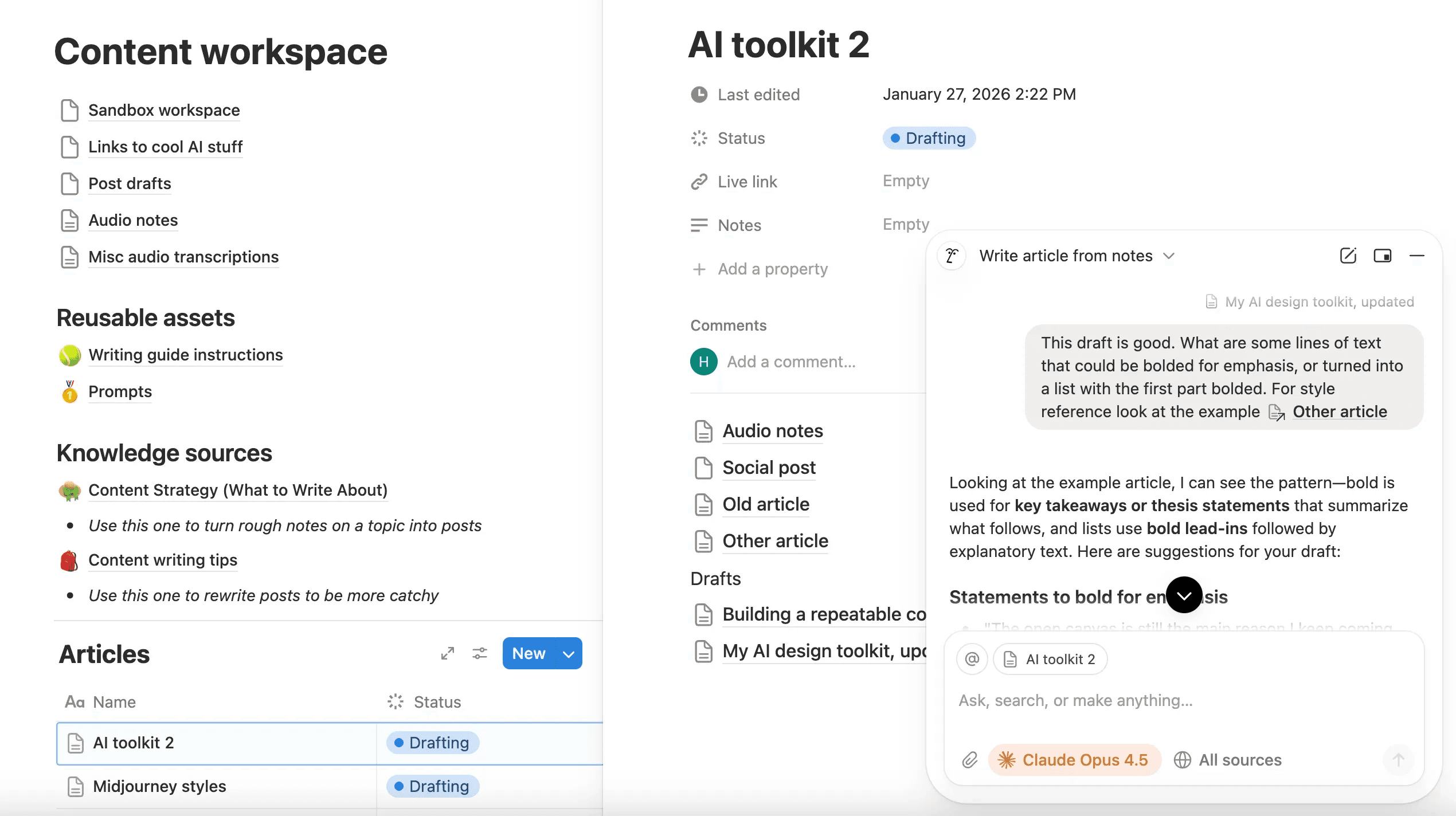
This has been the biggest change. Notion AI can work with everything Notion already does well: all the building blocks you already have like pages, databases, and integrations, and AI can now operate in that sandbox with you.
The limitation I kept running into with custom GPTs, Claude Projects, or NotebookLM is that they can all read from context, but don't have native flows for adding new context back in. With Notion AI, it can read and write, so it can pull from existing context and create new pages that feed back in as future context.
I'm using it for:
Project hubs: I set up internal wikis for my client projects and link them to the Linear MCP server to track project information and tasks and get quick summaries. I can also import my Granola notes for shared context.
Tracking quick notes and ideas: I can add notes from other places into a big database of ideas, along with quick audio recording and links, and use that as a second brain so I don't lose track of ideas buried in my notes app.
Content writing to iterate on and edit my articles. I've set up pages for writing guides to mimic my voice, reusable prompts for drafting copy, and a library of examples I can reference.
Documentation: I have prompts set up where I can record myself describing a feature while sharing my screen, then drop in the screenshots and transcription and have it turn that into written documentation for handoff to developers.
Right now I'm in the process of moving everything I had in Claude Projects over to Notion AI. Putting it all in Notion gives it superpowers where it can not only do everything it did before, but consistently improve over time as I add more feedback and context.
Note: Right now there's no usage tracking or limitations, which is great but I'm sure that won't last forever.
Midjourney's my new favorite image gen tool
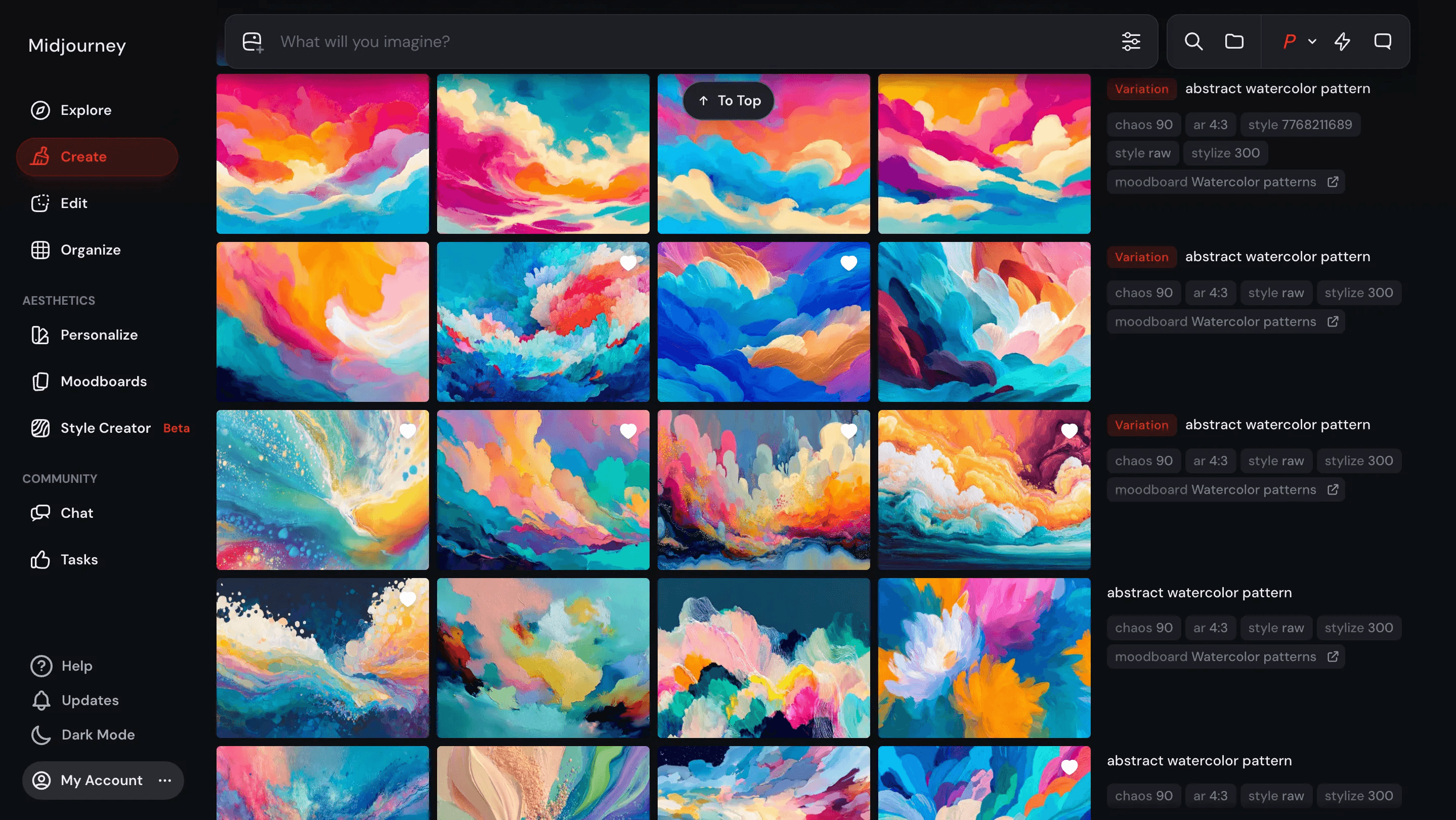
I finally dove into Midjourney and immediately fell in love with it. It solves some big problems I've had with other tools like training on a custom style for consistent generations, or tools that put too much burden on really precise prompting.
Midjourney handles all of this really well. You can use existing styles or build your own structured around style, color, and aesthetics based on existing Midjourney styles. And separate from that, you can build a mood board of any reference images you want to add. So when you combine styles and moodboards, you can have really fine-tuned control to personalize your generations and get really consistent, on-brand image assets.
You can also leave things wide open for exploration, and give it a one-word prompt to let it explore new ideas within your style.
That being said, there's still a place for other tools:
Nano Banana is still the best tool for editing existing images. For example that's what I use to mock up my book cover designs onto a photo for my Linkedin posts.
Krea has a really good all-purpose image editor, and a "realtime" mode you can play with
Figma's in-context editing is useful for really basic edits without leaving Figma
But for the most part Midjourney has become my main tool for image generation. I'm really excited to play with it more and find other ways to use it in my work.
Cursor's my favorite way to vibe code my designs
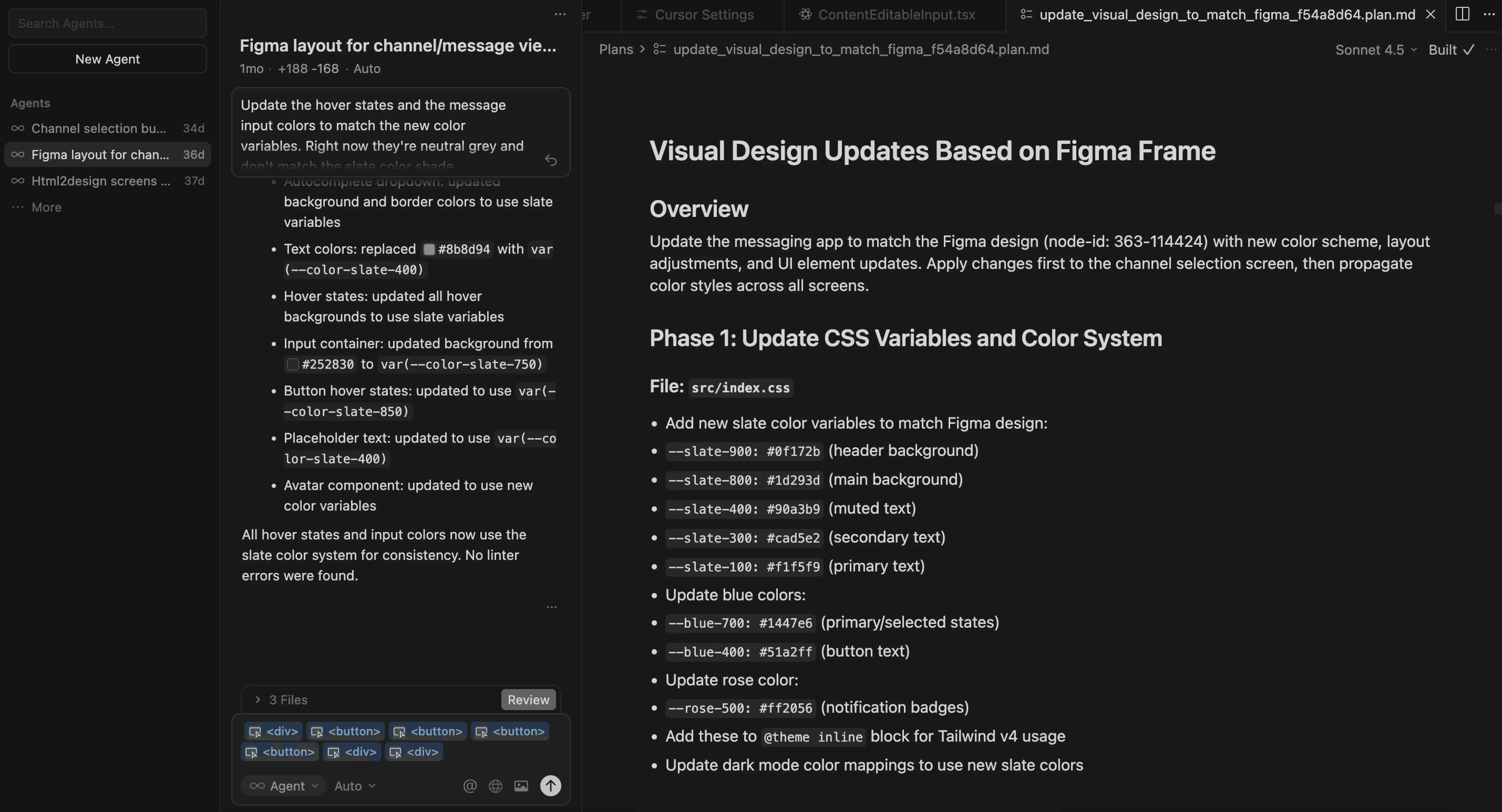
I've slowly been prototyping more and more in Cursor. The main benefit over vibe design tools like Lovable, MagicPatterns, or Figma Make is that Cursor doesn't impose opinions about architecture the way that other tools do, so you can do whatever you want. It can be a bit intimidating, but it's way more customizable.
You can still do everything a vibe coding tool does like chat, design mode, or planning mode, but you can also do a lot more. You can load custom fonts, pull in other React libraries, and manage versions with Git.
The biggest difference is that you can prototype within an existing codebase. So rather than making a bunch of disposable prototypes you can actually pull in your repo and prototype inside it instead of rebuilding from scratch.
And you also get access to MCP servers to pull in context from other products:
Figma MCP lets jump back into Figma to design something and send it back to Cursor instead of trying to describe your idea in text.
Linear MCP lets you pull in context from issues, or write new issues to track tasks as you work.
MagicPatterns MCP lets you keep your vibe design tool to explore a lot of ideas, and send the context back to Cursor when you pick a direction.
The biggest thing I'm still working on with Cursor is figuring out a repeatable setup. I have prototypes for multiple clients, and it's not scalable for me to set up a unique repo for each one, so I'm experimenting with setting up monorepos for each client to house all of my prototypes in one big project. This is a little more technical than my current skill set, but the potential benefits will be well worth the challenge.
Some other AI software in my product design toolkit
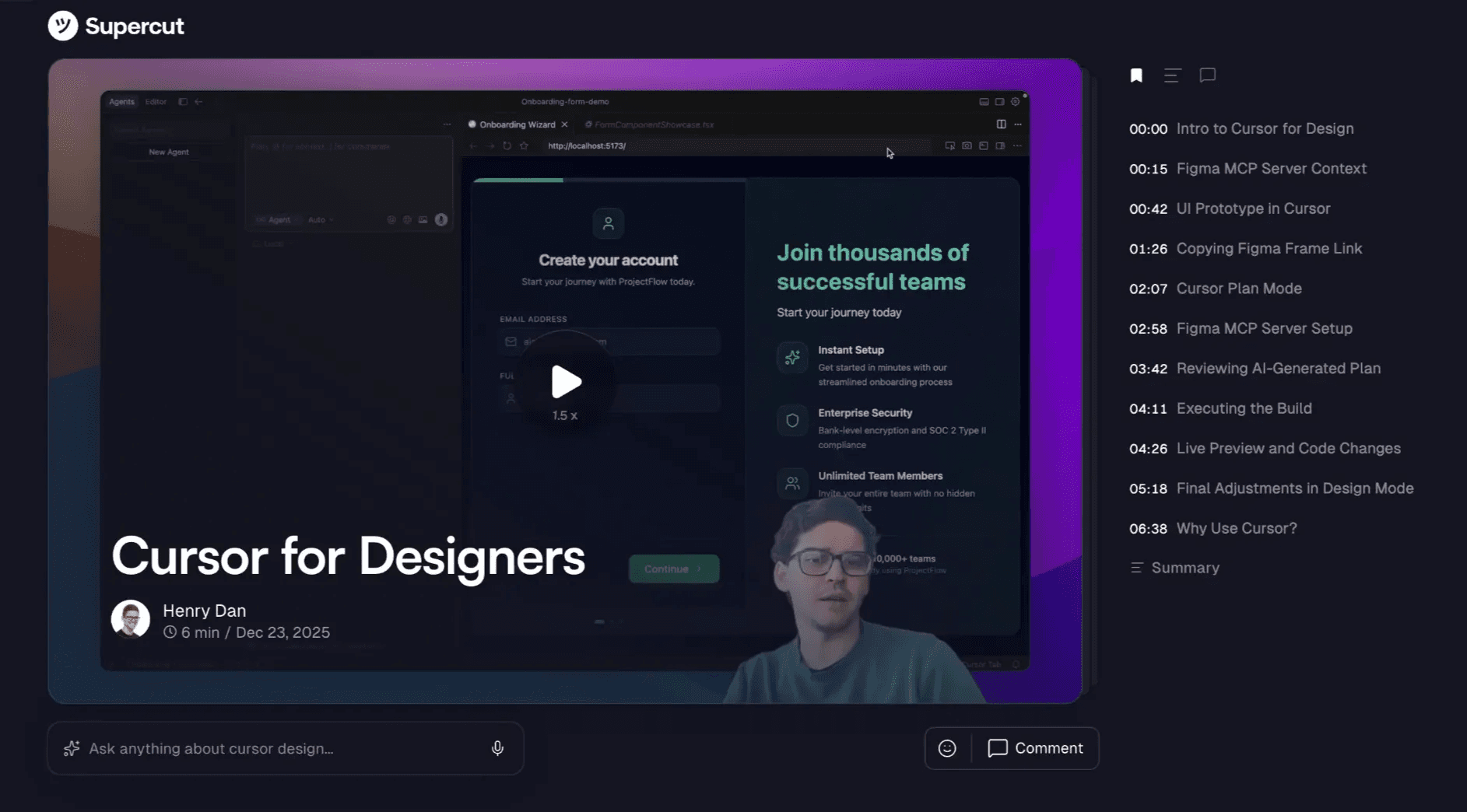
Supercut instead of Loom. It basically just does what Loom does but better. It's more reliable, better designed, gives more accurate transcriptions, and generates better chapters. It lets viewers chat with the recording, I can customize layouts, and more than anything it just works without all of the bugs, lag, and crashes.
AI-generated FigJam boards. Claude and Chatgpt have recently added FigJam integrations for generating diagrams. I really like the idea of a workflow of voice to Claude to Figjam for diagramming complex workflows. (Side note, Figjam has actually had has native import for Mermaid.js flowcharts for a while).
NotebookLM for learning. I really like that it's specifically tailored for learning. It always cites sources, and gives you shortcuts for slide decks, flow diagrams, flashcards, and quizzes. Worth noting that the slide decks it generates are shockingly good, (Not surprising since it's probably trained on Google Slides data).
Claude and Gemini research mode for design inspiration. I already use these for landscape analysis, where I'lll describe a vibe I'm going for and having it find software with similar aesthetics or interactions, or searching for direct competitors, or finding niche reference for specific UI patterns. It hasn't replaced my own research, but I like letting it run in parallel so I can see what ideas it comes up with.
I think Krea still has a place as an all-purpose image generation tool if you're just dipping your toe into image generation and want to try a lot of different models, or if you need AI editing capabilities beyond what Figma can handle.
Weavy (soon to be Figma Weave) is interesting for more complex repeated workflows for image generation. You can combine generation and editing steps to make it easy to repeatedly generate consistent assets, and you can share a UI for other people to fill in the blanks to generate other assets based on your workflow.
AI tools I'm curious about
One of the biggest thing I'm focused on right now is pushing all these new tools I've adopted to their limits. But in addition to that, there are a few new tools I'm really curious to explore more:
Keep your eye on Paper. They're still in alpha, but I'm calling it now: Paper is going to be the design tool of the future, the Figma killer. Just imaging prototyping in code, running design agents in your design tool, and using MCP servers to send it straight to Cursor. I honestly can't wait.
Using Cursor and Claude Code for more prototyping in existing codebases, not just standalone prototypes. I'd love to get to the point where I'm shipping my own PRs.
Remotion describes animations as code, which means AI can make motion graphics or promo videos. They recently released a Remotion skill for Claude Code, and I've seen people making impressive stuff.
MagicPatterns' MCP server could be a great way to tie vibe-designing into Cursor or Claude Code for more super-powered prototyping. It would be hard to give up Magicpath's canvas, but features like this might be worth it.
Comparing Claude in Cursor to Conductor or another GUI for Claude Code. Claude Code is awesome, but I'm not interested in strictly working in terminal so I'm curious what all of my options are.
Leva is a React library that surfaces controls for modifying component properties. It basically gives design mode controls to anything you build with AI so you can modify components and see props. It sounds basic but I can image a lot of areas where this would be a huge help in prototyping and handoff.
Figma Make with design systems has been teased for a while. I'm curious if that's a Config announcement this year. If so it could be a huge step forward in Figma Make being more useful for realistic prototypes and useful handoff docs when vibe coding.
Vibe coding my own tools: Internal tools for my business, Figma plugins, that sort of thing. This is where I started my vibe coding journey, and now that I'm more comfortable with these tools I think I could actually bring more of those ideas to life.
Explore Claude use cases: Anthropic released a page of Claude use cases a few months ago, showing how they recommend using Claude for different things and how they prompt it. I'd love to dive deeper into that.
Wrapping up
I know it feels intimidating to keep up with everything, but I hope this is a helpful jumping off point for you to see how some of these tools and use cases can fit into your work.
If anybody has any questions about any of this or ideas for topics you'd like me to cover in the future please feel free to reach out (hello@henrydan.me).
I'm always happy to chat about this stuff and help out if I can!
Subscribe for more articles like this
The AI design toolkit I use every day (Feb 2026)
The AI apps and tools that have actually stood the test of time for me
Henry Dan
Feb 4, 2026
A lot has changed in my AI workflow since the last time I wrote about this.
Some tools have stuck around, some have been replaced, and a few new ones have become completely indispensable for me. I wanted to go through what I'm actually using every day when it comes to AI tools for my design work, and how that has changed in the last 4 months.
MagicPath is still my go-to vibe design tool
4 months ago I was really excited about Magicpath for design, and that hasn't changed. The open canvas is still the main reason I keep coming back to it. I can see multiple UIs side-by-side, iterate quickly, or fork a UI to explore something new. There are other tools that offer similar features, but I've found that an open canvas is the easiest way for me to interact with a tool like this. Plus they've added Figma import recently, which is really useful.
That said, I've been eyeing MagicPatterns. They have features MagicPath doesn't offer yet, like an MCP server that lets you send designs directly with Cursor or Claude Code. MagicPatterns doesn't have the open canvas, but I'm curious if I'd be willing to make that trade-off for the integrations. Plus it still keeps a lot of my non-negotiables for an AI design tool:
Design mode editing so I can change spacing and layout without prompting
Non-destructive version control so I can easily jump between versions without reverting the entire design to an old version
Reusable components and styles so I can prototype separately and tie everything together later
and Built-in Figma import so I don't have to use screenshots
I'll probably give MagicPatterns a real shot soon and see if the integrations are worth losing the canvas.
Another one to watch out for is Paper. Still in alpha, but I'm really excited about what they're building (more on that later).
Claude's my chat tool (with some exceptions)
Claude is still my default chat tool, but how I use it has changed a bit. I lean on Claude more for individual conversations now, while I use other tools for more specialized workflows:
I prefer Notion AI over Claude projects or custom GPTs because of the modular way you can pull in content or write to content (more on this in the Notion AI section)
Gemini is great for image generation and research mode. Claude does research, but I like that Gemini produces these really in-depth, well-sourced research reports that are clear and comprehensive. Plus it was pretty cheap because I'm already paying for Google Workspace.
One thing that hasn't changed: in pretty much any tool that lets me select a model (Notion, Cursor, Granola) I'll almost always switch to Claude Sonnet or Opus. It's subjective, but I think it writes and codes better than any other model (which is 90% of what I use it for) and I just find myself running into fewer issues.
I've also been thinking about upgrading to Claude Max and building out a workflow in Claude Code for prototyping in Cursor, just so I can have one subscription instead of a handful of different tools.
Granola is still my second brain
Granola handles all my meeting transcriptions and note-taking. Last time I said It's basically my second brain and I think that still holds true. And it's not just good for notetaking, it's like a repo of all of the information you talk about at work, which turns it into an awesome source of context for AI.
Right now I'm working on setting up more reusable meeting templates and recipes for things I consistently ask it about, plus integrations to send notes to Notion. They've said they're going to release automatic Notion sync soon, which I'm excited about.
One thing that's shifted is that I also used to use Granola for my own personal audio notes, but I stopped doing that to try to keep my meeting context clean. Instead I've started using Notion's audio transcription for that instead.
Notion AI has taken over my work (in a good way)
This has been the biggest change. Notion AI can work with everything Notion already does well: all the building blocks you already have like pages, databases, and integrations, and AI can now operate in that sandbox with you.
The limitation I kept running into with custom GPTs, Claude Projects, or NotebookLM is that they can all read from context, but don't have native flows for adding new context back in. With Notion AI, it can read and write, so it can pull from existing context and create new pages that feed back in as future context.
I'm using it for:
Project hubs: I set up internal wikis for my client projects and link them to the Linear MCP server to track project information and tasks and get quick summaries. I can also import my Granola notes for shared context.
Tracking quick notes and ideas: I can add notes from other places into a big database of ideas, along with quick audio recording and links, and use that as a second brain so I don't lose track of ideas buried in my notes app.
Content writing to iterate on and edit my articles. I've set up pages for writing guides to mimic my voice, reusable prompts for drafting copy, and a library of examples I can reference.
Documentation: I have prompts set up where I can record myself describing a feature while sharing my screen, then drop in the screenshots and transcription and have it turn that into written documentation for handoff to developers.
Right now I'm in the process of moving everything I had in Claude Projects over to Notion AI. Putting it all in Notion gives it superpowers where it can not only do everything it did before, but consistently improve over time as I add more feedback and context.
Note: Right now there's no usage tracking or limitations, which is great but I'm sure that won't last forever.
Midjourney's my new favorite image gen tool
I finally dove into Midjourney and immediately fell in love with it. It solves some big problems I've had with other tools like training on a custom style for consistent generations, or tools that put too much burden on really precise prompting.
Midjourney handles all of this really well. You can use existing styles or build your own structured around style, color, and aesthetics based on existing Midjourney styles. And separate from that, you can build a mood board of any reference images you want to add. So when you combine styles and moodboards, you can have really fine-tuned control to personalize your generations and get really consistent, on-brand image assets.
You can also leave things wide open for exploration, and give it a one-word prompt to let it explore new ideas within your style.
That being said, there's still a place for other tools:
Nano Banana is still the best tool for editing existing images. For example that's what I use to mock up my book cover designs onto a photo for my Linkedin posts.
Krea has a really good all-purpose image editor, and a "realtime" mode you can play with
Figma's in-context editing is useful for really basic edits without leaving Figma
But for the most part Midjourney has become my main tool for image generation. I'm really excited to play with it more and find other ways to use it in my work.
Cursor's my favorite way to vibe code my designs
I've slowly been prototyping more and more in Cursor. The main benefit over vibe design tools like Lovable, MagicPatterns, or Figma Make is that Cursor doesn't impose opinions about architecture the way that other tools do, so you can do whatever you want. It can be a bit intimidating, but it's way more customizable.
You can still do everything a vibe coding tool does like chat, design mode, or planning mode, but you can also do a lot more. You can load custom fonts, pull in other React libraries, and manage versions with Git.
The biggest difference is that you can prototype within an existing codebase. So rather than making a bunch of disposable prototypes you can actually pull in your repo and prototype inside it instead of rebuilding from scratch.
And you also get access to MCP servers to pull in context from other products:
Figma MCP lets jump back into Figma to design something and send it back to Cursor instead of trying to describe your idea in text.
Linear MCP lets you pull in context from issues, or write new issues to track tasks as you work.
MagicPatterns MCP lets you keep your vibe design tool to explore a lot of ideas, and send the context back to Cursor when you pick a direction.
The biggest thing I'm still working on with Cursor is figuring out a repeatable setup. I have prototypes for multiple clients, and it's not scalable for me to set up a unique repo for each one, so I'm experimenting with setting up monorepos for each client to house all of my prototypes in one big project. This is a little more technical than my current skill set, but the potential benefits will be well worth the challenge.
Some other AI software in my product design toolkit
Supercut instead of Loom. It basically just does what Loom does but better. It's more reliable, better designed, gives more accurate transcriptions, and generates better chapters. It lets viewers chat with the recording, I can customize layouts, and more than anything it just works without all of the bugs, lag, and crashes.
AI-generated FigJam boards. Claude and Chatgpt have recently added FigJam integrations for generating diagrams. I really like the idea of a workflow of voice to Claude to Figjam for diagramming complex workflows. (Side note, Figjam has actually had has native import for Mermaid.js flowcharts for a while).
NotebookLM for learning. I really like that it's specifically tailored for learning. It always cites sources, and gives you shortcuts for slide decks, flow diagrams, flashcards, and quizzes. Worth noting that the slide decks it generates are shockingly good, (Not surprising since it's probably trained on Google Slides data).
Claude and Gemini research mode for design inspiration. I already use these for landscape analysis, where I'lll describe a vibe I'm going for and having it find software with similar aesthetics or interactions, or searching for direct competitors, or finding niche reference for specific UI patterns. It hasn't replaced my own research, but I like letting it run in parallel so I can see what ideas it comes up with.
I think Krea still has a place as an all-purpose image generation tool if you're just dipping your toe into image generation and want to try a lot of different models, or if you need AI editing capabilities beyond what Figma can handle.
Weavy (soon to be Figma Weave) is interesting for more complex repeated workflows for image generation. You can combine generation and editing steps to make it easy to repeatedly generate consistent assets, and you can share a UI for other people to fill in the blanks to generate other assets based on your workflow.
AI tools I'm curious about
One of the biggest thing I'm focused on right now is pushing all these new tools I've adopted to their limits. But in addition to that, there are a few new tools I'm really curious to explore more:
Keep your eye on Paper. They're still in alpha, but I'm calling it now: Paper is going to be the design tool of the future, the Figma killer. Just imaging prototyping in code, running design agents in your design tool, and using MCP servers to send it straight to Cursor. I honestly can't wait.
Using Cursor and Claude Code for more prototyping in existing codebases, not just standalone prototypes. I'd love to get to the point where I'm shipping my own PRs.
Remotion describes animations as code, which means AI can make motion graphics or promo videos. They recently released a Remotion skill for Claude Code, and I've seen people making impressive stuff.
MagicPatterns' MCP server could be a great way to tie vibe-designing into Cursor or Claude Code for more super-powered prototyping. It would be hard to give up Magicpath's canvas, but features like this might be worth it.
Comparing Claude in Cursor to Conductor or another GUI for Claude Code. Claude Code is awesome, but I'm not interested in strictly working in terminal so I'm curious what all of my options are.
Leva is a React library that surfaces controls for modifying component properties. It basically gives design mode controls to anything you build with AI so you can modify components and see props. It sounds basic but I can image a lot of areas where this would be a huge help in prototyping and handoff.
Figma Make with design systems has been teased for a while. I'm curious if that's a Config announcement this year. If so it could be a huge step forward in Figma Make being more useful for realistic prototypes and useful handoff docs when vibe coding.
Vibe coding my own tools: Internal tools for my business, Figma plugins, that sort of thing. This is where I started my vibe coding journey, and now that I'm more comfortable with these tools I think I could actually bring more of those ideas to life.
Explore Claude use cases: Anthropic released a page of Claude use cases a few months ago, showing how they recommend using Claude for different things and how they prompt it. I'd love to dive deeper into that.
Wrapping up
I know it feels intimidating to keep up with everything, but I hope this is a helpful jumping off point for you to see how some of these tools and use cases can fit into your work.
If anybody has any questions about any of this or ideas for topics you'd like me to cover in the future please feel free to reach out (hello@henrydan.me).
I'm always happy to chat about this stuff and help out if I can!
Subscribe for more articles like this
The AI design toolkit I use every day (Feb 2026)
The AI apps and tools that have actually stood the test of time for me
Henry Dan
Feb 4, 2026
A lot has changed in my AI workflow since the last time I wrote about this.
Some tools have stuck around, some have been replaced, and a few new ones have become completely indispensable for me. I wanted to go through what I'm actually using every day when it comes to AI tools for my design work, and how that has changed in the last 4 months.
MagicPath is still my go-to vibe design tool
4 months ago I was really excited about Magicpath for design, and that hasn't changed. The open canvas is still the main reason I keep coming back to it. I can see multiple UIs side-by-side, iterate quickly, or fork a UI to explore something new. There are other tools that offer similar features, but I've found that an open canvas is the easiest way for me to interact with a tool like this. Plus they've added Figma import recently, which is really useful.
That said, I've been eyeing MagicPatterns. They have features MagicPath doesn't offer yet, like an MCP server that lets you send designs directly with Cursor or Claude Code. MagicPatterns doesn't have the open canvas, but I'm curious if I'd be willing to make that trade-off for the integrations. Plus it still keeps a lot of my non-negotiables for an AI design tool:
Design mode editing so I can change spacing and layout without prompting
Non-destructive version control so I can easily jump between versions without reverting the entire design to an old version
Reusable components and styles so I can prototype separately and tie everything together later
and Built-in Figma import so I don't have to use screenshots
I'll probably give MagicPatterns a real shot soon and see if the integrations are worth losing the canvas.
Another one to watch out for is Paper. Still in alpha, but I'm really excited about what they're building (more on that later).
Claude's my chat tool (with some exceptions)
Claude is still my default chat tool, but how I use it has changed a bit. I lean on Claude more for individual conversations now, while I use other tools for more specialized workflows:
I prefer Notion AI over Claude projects or custom GPTs because of the modular way you can pull in content or write to content (more on this in the Notion AI section)
Gemini is great for image generation and research mode. Claude does research, but I like that Gemini produces these really in-depth, well-sourced research reports that are clear and comprehensive. Plus it was pretty cheap because I'm already paying for Google Workspace.
One thing that hasn't changed: in pretty much any tool that lets me select a model (Notion, Cursor, Granola) I'll almost always switch to Claude Sonnet or Opus. It's subjective, but I think it writes and codes better than any other model (which is 90% of what I use it for) and I just find myself running into fewer issues.
I've also been thinking about upgrading to Claude Max and building out a workflow in Claude Code for prototyping in Cursor, just so I can have one subscription instead of a handful of different tools.
Granola is still my second brain
Granola handles all my meeting transcriptions and note-taking. Last time I said It's basically my second brain and I think that still holds true. And it's not just good for notetaking, it's like a repo of all of the information you talk about at work, which turns it into an awesome source of context for AI.
Right now I'm working on setting up more reusable meeting templates and recipes for things I consistently ask it about, plus integrations to send notes to Notion. They've said they're going to release automatic Notion sync soon, which I'm excited about.
One thing that's shifted is that I also used to use Granola for my own personal audio notes, but I stopped doing that to try to keep my meeting context clean. Instead I've started using Notion's audio transcription for that instead.
Notion AI has taken over my work (in a good way)
This has been the biggest change. Notion AI can work with everything Notion already does well: all the building blocks you already have like pages, databases, and integrations, and AI can now operate in that sandbox with you.
The limitation I kept running into with custom GPTs, Claude Projects, or NotebookLM is that they can all read from context, but don't have native flows for adding new context back in. With Notion AI, it can read and write, so it can pull from existing context and create new pages that feed back in as future context.
I'm using it for:
Project hubs: I set up internal wikis for my client projects and link them to the Linear MCP server to track project information and tasks and get quick summaries. I can also import my Granola notes for shared context.
Tracking quick notes and ideas: I can add notes from other places into a big database of ideas, along with quick audio recording and links, and use that as a second brain so I don't lose track of ideas buried in my notes app.
Content writing to iterate on and edit my articles. I've set up pages for writing guides to mimic my voice, reusable prompts for drafting copy, and a library of examples I can reference.
Documentation: I have prompts set up where I can record myself describing a feature while sharing my screen, then drop in the screenshots and transcription and have it turn that into written documentation for handoff to developers.
Right now I'm in the process of moving everything I had in Claude Projects over to Notion AI. Putting it all in Notion gives it superpowers where it can not only do everything it did before, but consistently improve over time as I add more feedback and context.
Note: Right now there's no usage tracking or limitations, which is great but I'm sure that won't last forever.
Midjourney's my new favorite image gen tool
I finally dove into Midjourney and immediately fell in love with it. It solves some big problems I've had with other tools like training on a custom style for consistent generations, or tools that put too much burden on really precise prompting.
Midjourney handles all of this really well. You can use existing styles or build your own structured around style, color, and aesthetics based on existing Midjourney styles. And separate from that, you can build a mood board of any reference images you want to add. So when you combine styles and moodboards, you can have really fine-tuned control to personalize your generations and get really consistent, on-brand image assets.
You can also leave things wide open for exploration, and give it a one-word prompt to let it explore new ideas within your style.
That being said, there's still a place for other tools:
Nano Banana is still the best tool for editing existing images. For example that's what I use to mock up my book cover designs onto a photo for my Linkedin posts.
Krea has a really good all-purpose image editor, and a "realtime" mode you can play with
Figma's in-context editing is useful for really basic edits without leaving Figma
But for the most part Midjourney has become my main tool for image generation. I'm really excited to play with it more and find other ways to use it in my work.
Cursor's my favorite way to vibe code my designs
I've slowly been prototyping more and more in Cursor. The main benefit over vibe design tools like Lovable, MagicPatterns, or Figma Make is that Cursor doesn't impose opinions about architecture the way that other tools do, so you can do whatever you want. It can be a bit intimidating, but it's way more customizable.
You can still do everything a vibe coding tool does like chat, design mode, or planning mode, but you can also do a lot more. You can load custom fonts, pull in other React libraries, and manage versions with Git.
The biggest difference is that you can prototype within an existing codebase. So rather than making a bunch of disposable prototypes you can actually pull in your repo and prototype inside it instead of rebuilding from scratch.
And you also get access to MCP servers to pull in context from other products:
Figma MCP lets jump back into Figma to design something and send it back to Cursor instead of trying to describe your idea in text.
Linear MCP lets you pull in context from issues, or write new issues to track tasks as you work.
MagicPatterns MCP lets you keep your vibe design tool to explore a lot of ideas, and send the context back to Cursor when you pick a direction.
The biggest thing I'm still working on with Cursor is figuring out a repeatable setup. I have prototypes for multiple clients, and it's not scalable for me to set up a unique repo for each one, so I'm experimenting with setting up monorepos for each client to house all of my prototypes in one big project. This is a little more technical than my current skill set, but the potential benefits will be well worth the challenge.
Some other AI software in my product design toolkit
Supercut instead of Loom. It basically just does what Loom does but better. It's more reliable, better designed, gives more accurate transcriptions, and generates better chapters. It lets viewers chat with the recording, I can customize layouts, and more than anything it just works without all of the bugs, lag, and crashes.
AI-generated FigJam boards. Claude and Chatgpt have recently added FigJam integrations for generating diagrams. I really like the idea of a workflow of voice to Claude to Figjam for diagramming complex workflows. (Side note, Figjam has actually had has native import for Mermaid.js flowcharts for a while).
NotebookLM for learning. I really like that it's specifically tailored for learning. It always cites sources, and gives you shortcuts for slide decks, flow diagrams, flashcards, and quizzes. Worth noting that the slide decks it generates are shockingly good, (Not surprising since it's probably trained on Google Slides data).
Claude and Gemini research mode for design inspiration. I already use these for landscape analysis, where I'lll describe a vibe I'm going for and having it find software with similar aesthetics or interactions, or searching for direct competitors, or finding niche reference for specific UI patterns. It hasn't replaced my own research, but I like letting it run in parallel so I can see what ideas it comes up with.
I think Krea still has a place as an all-purpose image generation tool if you're just dipping your toe into image generation and want to try a lot of different models, or if you need AI editing capabilities beyond what Figma can handle.
Weavy (soon to be Figma Weave) is interesting for more complex repeated workflows for image generation. You can combine generation and editing steps to make it easy to repeatedly generate consistent assets, and you can share a UI for other people to fill in the blanks to generate other assets based on your workflow.
AI tools I'm curious about
One of the biggest thing I'm focused on right now is pushing all these new tools I've adopted to their limits. But in addition to that, there are a few new tools I'm really curious to explore more:
Keep your eye on Paper. They're still in alpha, but I'm calling it now: Paper is going to be the design tool of the future, the Figma killer. Just imaging prototyping in code, running design agents in your design tool, and using MCP servers to send it straight to Cursor. I honestly can't wait.
Using Cursor and Claude Code for more prototyping in existing codebases, not just standalone prototypes. I'd love to get to the point where I'm shipping my own PRs.
Remotion describes animations as code, which means AI can make motion graphics or promo videos. They recently released a Remotion skill for Claude Code, and I've seen people making impressive stuff.
MagicPatterns' MCP server could be a great way to tie vibe-designing into Cursor or Claude Code for more super-powered prototyping. It would be hard to give up Magicpath's canvas, but features like this might be worth it.
Comparing Claude in Cursor to Conductor or another GUI for Claude Code. Claude Code is awesome, but I'm not interested in strictly working in terminal so I'm curious what all of my options are.
Leva is a React library that surfaces controls for modifying component properties. It basically gives design mode controls to anything you build with AI so you can modify components and see props. It sounds basic but I can image a lot of areas where this would be a huge help in prototyping and handoff.
Figma Make with design systems has been teased for a while. I'm curious if that's a Config announcement this year. If so it could be a huge step forward in Figma Make being more useful for realistic prototypes and useful handoff docs when vibe coding.
Vibe coding my own tools: Internal tools for my business, Figma plugins, that sort of thing. This is where I started my vibe coding journey, and now that I'm more comfortable with these tools I think I could actually bring more of those ideas to life.
Explore Claude use cases: Anthropic released a page of Claude use cases a few months ago, showing how they recommend using Claude for different things and how they prompt it. I'd love to dive deeper into that.
Wrapping up
I know it feels intimidating to keep up with everything, but I hope this is a helpful jumping off point for you to see how some of these tools and use cases can fit into your work.
If anybody has any questions about any of this or ideas for topics you'd like me to cover in the future please feel free to reach out (hello@henrydan.me).
I'm always happy to chat about this stuff and help out if I can!
Subscribe for more articles like this